Wednesday, August 12, 2009

How to Get Good Old Classic Start Menu Back in Windows 7

What? There is no Classic Start menu in Windows 7? That's the most common question which Windows 7 users ask us. Actually Microsoft has completely removed Classic start menu from Windows 7 and you are forced to use the new Vista like start menu.

Although the new start menu is much better than the classic one, lots of people still prefer the Classic one. So what to do? Here is the solution.

"CSMenu" is a small application for Windows 7 which can bring the Classic start menu back in Windows 7. You just need to install it and run the application. There is also a portable version available so you can run it without installing.

Following is a screenshot of CSMenu in action:


You can Pin its shortcut to Taskbar so that you can use it similar to Start button.

You can also hide default Start ORB using "Start Killer".

You can give it a try using following link:
Download CSMenu (Classic Start Menu for Windows 7)

NOTE: When we install it, it didn't create its shortcut in Programs menu or Desktop. If you also face this problem, you can run its EXE file from "%programfiles\CSMenu" folder.

Copy from : http://www.askvg.com

Monitor ES – Power Off Monitor When You Lock Your Computer

Monitor ES is one such free utility which lets you to save a good amount of energy and money by doing some amazing tweaks on your computer including the following ones


  • Automatically turnoff monitor

  • Automatically pause all media programs

  • Automatically IM away status message

  • Hot key supported

  • Customize options

  • Auto Start with windows


One of the most important features of this small program is it allows you to turn off your monitor automatically when you lock your computer, this could save a good amount of energy. Moreover you can turn off the monitor display by pressing the hotkey "CTRL+F2"

It supports the pause and play back of following media players including 
Winamp , AIMP , Windows Media Player and messengers included is Gtalk.

Download Monitor ES

Copy from : http://www.technixupdate.com

Get Colors used in any Image Online with ColourGrab

If you find any interesting image online which has a great color combination and you want to use it in your theme, but then you will need a software or a color picker installed to get the color from the image. ColourGrab is a free online service which can provide you with the most used colors in any image hosted online. You need to type a URL of any online image below and the system will tell you the most used colors from that image.


The image should be hosted online and the service does not offer to upload the image from your local folder. Once it analyses the service provides you with the most used color codes in the image.


The application also provides you with the download link for Adobe® Switch for the color scheme for developers. ColourGrab is a simple yet useful service to quickly get the color code from any image.

ColourGrab

Copy from : http://www.nirmaltv.com

Metacafe Video Downloader

Metacafe Video Downloader is a free application designed for downloading and saving videos from Metacafe to your PC, iPod, iPhone, PSP, Mobile Phone with one-click. You do not need any video players to play flash video, you can just play it on the default media player classic and no extra codec or players needed. You only need to have the URL of the video you want to download.


Enter the URL of the video into the program and press add, and the file will be downloaded into the selected folder. You can save the downloaded video into various formats: .avi, .mpeg, .flv, .wmv which makes it much more easier to use.

Features of Metacafe Video Downloader;


  • Easy to use

  • Get the size, length of a file before downloading it

  • Clean, simple interface

  • Download several files at the same time

  • Save Metacafe video as an .avi, .mpeg, .wmv, .flv file


Metacafe Video Downloader is a small, fast, useful, practical and powerful application which will work will all versions of Windows.

Download Metacafe Video Downloader


Copy from : http://www.nirmaltv.com

Saturday, July 25, 2009

Sumatra PDF, Simple and Light PDF Reader

This is not the first time I’m saying that Adobe Reader is very slow. PDF documents are commonly opened by Adobe Reader, the most popular PDF Reader right now, but it takes time to startup and is very slow.

I’ve always looked for the best and fastest applications I use for whatever work. And in case of PDF readers, I mostly prefer webapps for handling such documents like .DOC, .PPT etc. But for people looking for a simple desktop PDF reader, I’ve found a great app!


Sumatra PDF is a free PDF reader which is really slim, light and open-source. This freeware has a very minimalistic design which has concentrated on it’s simplicity rather than adding tons of features that are not commonly used, yet serves the basic purpose of allowing users read PDF documents.

Related: Foxit Reader: The Best Free PDF Reader

This little freeware starts up very fast and is very small in size. It has been designed for USB drives so users can carry it on any portable device.

A must-have application for those who read PDF format files a lot while on the go. You’ll don’t have to depend on web apps like Google Docs.

Download Sumatra PDF


You can download this freeware PDF reader from here: Download Sumatra PDF

Copy from : http://www.sizzledcore.com

Calculate the Download time based on Speed and Size

Most of time when we download huge files from Internet, we might not be sure how much time it would take to download the file as it depends on the speed of your connection. Transfer Time Calculator is a simple freeware application designed to be a small program that lets you calculate a file size, connection speed, or download time. It can calculate the time required or the speed required to download a particular file size.


You can enter one or more parameters and get the third one calcuated. This utility should be useful to find the speed or time required to download any particular file size. The connection speeds are available in Kilo, Mega and Giga bytes or bits. You can specify the file size in Kilo, Mega, Giga and Terabytes.

The utility is just 44kb in size and does not require any installation.
Download Transfer Time Calculator

Copy from : http://www.nirmaltv.com

Outlook Attachment Reminder for Office 2007 and 2010

It can happen often that we sent a mail saying attached file but actually missing attaching the file. Outlook essentials which we had covered earlier is a good solution to forgetting attachments. Outlook Attachment Reminder is a free application which can remind you if you have not attached before sending the mail. Outlook Attachment Reminder is built to work with Office Outlook 2007 and also with 2010.


The application searches for words like attachment, attached etc. which of course you can manage and if they exist, it checks if there are any files attached. If no attachments are found, then it will prompt with a message box. Then you can add the attachment.

This is developed in VS 2008 (C# and requires .NET 3.5), using the VSTO. Outlook Attachment reminder is not very easily accessible in Outlook 2010 and the author says that once the technical preview is out, more features will be added.

The author also calls for bug reporting as well as feature requests for the future versions. we feel that Outlook Attachment Reminder should have been an in build feature in Outlook rather than installing an add-in.

Download Outlook Attachment Reminder

Copy from : http://www.nirmaltv.com

Google Chrome - Latest Version [ Updated ]

Google chrome is proving to be one the best browsers after firefox which is being liked by lots of people now a days, it has been improving in terms of speed and performance from the first it has been launched.

I just upgraded to the latest google chrome 3.0.190.1 Dev and found it really good and responsive even when I opened large number of websites in it. It is quite better in terms of speed as compared to latest firefox as far as I think till now :)

Here are all latest updated direct download links for the latest version of Google Chrome Released till now

Direct Download Links For 3.0.190.1 Dev / 2.0.172.33 Stable / 1.0.154.65 Stable Versions


Secure Download (US) - Dev | Secure Download (US) - Stable 2 | Secure Download (RO) - Stable 2 | Secure Download (US) - Stable 1 | Secure Download (RO) - Stable 1

You can track this page for offline installer of google chrome
Read Also: Download Google Chrome Full Setup [ Offline Installer ]

Copy from : http://www.technixupdate.com

Wednesday, July 22, 2009

Ways To Access Blocked Websites

Hi friends today i am back with you with some internet tips not with the usual tips of my blogging. As you would have seen while accessing some sites you are blocked from opening them, if you surfing them from your school, college or from an office if you are employed. While when i was in college we were blocked from using social media sites like orkut and in offices you will be blocked from using many sites like these to get surf. So we got to use proxies at that time to access them but it may not work always, so i am sharing many ways to get access these websites and implement it according to your need to make it work. You may also find an important tip on how to make slower internet connection browse faster.


  1. Using IP Instead of URL
    This depends on the software/application used. Sometimes blocked sites are stored as a list of URLs (eg. www.yahoo.com, www.donwload.com,etc) and typing the IP instead of the URL might sometimes work. In a local computer, doing a ping domain.com command in Command Prompt (Mac users use Terminal) will return you the IP address. You can also do it online via www.whatsmyip.org.
  2. Redirection with Short URL service
    Sometimes the URL you intend to browse might be ban, but converting them to another a shorter URL with short URL services might just help you to bypass the settings.
    Here’s 2 Short URL service you can use – MooURL, SnipURL
  3. Google Cache
    Search engines like Google and Yahoo cache webpages and these cached pages are stored in search engines themselves, which likely will be added to the blocked list. Click on the ‘cache’ will bring you to a cache version of the page, as updated as how Google caches it.
  4. Internet Archive – Wayback Machine
    Wayback Machine is a internet service that periodically keeps a copy of almost all websites in the Internet way from the date they’re started. Clicking on the latest copy of what Wayback Machine have should be somewhat similar to the real site. Another way to access blocked sites via caches.
  5. Anonymous Surfing
    Some site allows you to take advantage of their proxy or domain to surf other sites as anonymous. Just search proxy websites on google and you get a list of them.
  6. Use Proxy in Browsers
    There are tons of sites out there that distributes free proxies of almost any country. Here’s an example. Check out the following methods on how/where to insert proxies in your web browsers.

    Proxy Surfing – Firefox
    Under Advanced tab, select Network tab, then click inside Connection Settings. Select Manual proxy configuration, put proxy under HTTP proxy.
    Proxy Surfing – Internet Explorer
    Go to Tools -> Internet Options. Select Connections tab. Click into LAN Settings, check Proxy Server. Insert your proxy URL inside Address.
  7. Bypass with Translations services
    Online translation services like AltaVista BabelFish, Google Translate allows you to translate a website from one language to another and display the translated results on their own page. The trick here is to enter the URL (website you’re blocked), retranslate it even if you don’t need to and let Google or AltaVista fetch you the content.
  8. Subscribe to RSS Feed
    This might not work for all sites, but if the site you intended to visit provides RSS feeds, you can subscribe and read it with a RSS reader, or have it regularly send the contents to your email.
  9. Retrieve web pages via Email
    Web2Mail is a free service that sends websites you want to read right into your inbox. All you need to do is send an email to www@web2mail.com with the URL as subject title.


Copy from : http://anshuldudeja.blogspot.com

Top 10 Ads Programs

Top 10 Ad Programs for Web Publishers


If you are a Blogger, Webmaster or a Web Publisher you always seeks to best ad programs for your website to earn good revenue. Running a TEXT or IMAGE ads is one of the most popular method. Text or Image ads are shown which match the content of the pages. Contextual ads are often displayed to the right or left of website, or as blocks within sections of the text.

Apart from Google's Adsense there are some good ad programs for Bloggers, Webmasters and Web Publishers. Here I am sharing some good and free ad programs for you:

1) Yahoo Publisher Network

Yahoo Publisher NetworkWorks very similar to Google's Adsense program. You design your own ads, choosing colors and formats, then paste some code on your page. You'll be paid per click. Advanced ad targeting and display capabilities can sometimes improve your results. You can choose to be paid via Paypal once your earnings are $50.00, or a check when you hit $100.00.

2) Adbrite

AdbriteA variety of ad formats to choose from. You can run text ads, banners, inline ads or even full page ads. You can choose to approve or reject ads before they appear on your site. Pays monthly with the default minimum check amount of $100.00. Once your site is approved, ads will appear within 24 hours of your pasting the code. Adbrite has no policy against using other ad networks on your site at the same time.

3) Kontera

KonteraContextually relevant ads and ad units which are linked to keywords on your web page. Ads displayed will match the content of your site. For your website to be approved it must be in English, be content rich with more than 50 words per page. You can run text, image, billboard, and video ads.


4) Bidvertiser

Bidvertiser.comDisplay text ads on your website and let advertisers bid against each other. Ad formats are skyscrapers, banners, rectangles, buttons. They even have ads for your RSS feeds. Payout is monthly via Paypal once your balance is $10.00. This one pays on a cost per click basis.


5) Chitika's Ads

Chitika's AdsA full service online ad network which serves over two billion monthly impressions across more than 30,000 websites. Chitika ads are not contextual and can be run on the same page as Adsense. Twenty-four different ad sizes are available. Payment is via Paypal once your account is at $10.00, or a check when you reach $50.00.

6) Text-Link-Ads.com

Text-Link-Ads.comOnce your site is approved, you insert the code on your page and they sell simple text ads that appear on your site. You have final say over any ads being published. Payments are made via Paypal or Clickbank. You receive 50% of the sale price for each link they serve up. This ad network is acceptable to be run on the same page as Google Adsense as this is not considered contextual advertising.

7) Quigo.com

Quigo.comQuigo offers content-targeted advertising to those with strong traffic. Publishers with 500,000 or more monthly page views are encouraged to apply. Once approved, simply copy and paste the code.


8) Miva

MivaMiva offers a wide variety of ad formats to choose from: content ads, inline ads, search ads. You'll be paid on a per click basis. Payments are made monthly by check or Paypal once your balance reaches $25.00. You can also block competitor ads from appearing on your site.


9) AffiliatesGarage.com

AffiliatesGarage.comA different type of ad network which allows you to display affiliate ads in an "Adsense Style". You can run Clickbank and Paydotcom text ads on your site or blog and earn up to 75% commission.


10) AmaSense Ads

AmaSense AdsAmaSenseAds is a service that allows you to create Google AdSense styled ads for Amazon.com products (see our example below). It is super easy to use and you can sign up for free. AmaSenseAds allows you to market Amazon products in the most proven ad style format.

If your websites or blog are mainly based on information, network advertising is an excellent option for you to earn an income with little effort on your part. No matter if you use Adsense or another service, it just makes for good dollars and cents.

Copy from : http://tutorialfeed.blogspot.com

Check your Website Color Contrast

Check your Website Color Contrast with CheckMyColours


Many times when we design website or blog themes, it is very difficult to know which is the best color format which is readable and provides the best color contrast. CheckMyColours is an online service which checks foreground and background color combinations of all DOM elements and determines if they provide sufficient contrast when viewed by someone having color deficits.

logo

Enter the website color contrast you want to check and it returns the complete detailed report. All the tests are done based on the algorithms suggested by the World Wide Web Consortium (W3C). This tool gives a detailed report on site contrasts levels of different elements like image, text or any CSS used in the theme.

image

The tool gives result in three categories Luminosity Contrast Ratio, Brightness difference and Color difference. When you click on each cell, it gives suggestion on which color would be better. CheckMyColor is not a substitution to any other tool, but can be handy to check the color contrast.

CheckMyColours

Copy from : http://www.nirmaltv.com

AutoHistory for Word 2007

AutoHistory for Word 2007 Creates Back up on Save


Microsoft Word has powerful set of tools to track any changes to the document under the review tab. Although this feature tracks all the changes made to the document, it is often difficult for normal users to track the changes. AutoHistory can be said as a simpler version of the default word tracking tools. AutoHistory for Word 2007 provides a local history for documents. You can view and restore each version you’ve ever saved. Once installed it adds an item in the ribbon under view called Auto History.

view-record-history

AutoHistory now provides the same functionality within Word 2007. Every time you save your document and some change has been made, a backup is created. These back up files are available in the sidebar of the word document. You can restore every version you’ve ever saved, even if you do not use a version control system.

view-record-history

There is also option to compare or restore selected files and once you are finalized, you can also delete the history of files. If you want more detailed options for tracking the changes, then the word build in tool has more detailed options. This tool is handy only for smaller details in tracking.

Download Auto History
Copy from : http://www.nirmaltv.com

Download Kaspersky Internet Security 2010

kaspersky-internet-security-2010-boxAlong with the release of Kaspersky Antivirus (KAV) 2010, Kaspersky Labs also released their premium security suit called Kaspersky Internet Security 2010.
It provide all the tools, features, services that one needs to have for a complete safe and secure internet experience, whether home or in office. Including the technology and all the features of Kaspersky Antivirus 2010 are also in it.

The same goes for KIS 2010, that the first thing you will notice is the new and improved interface nad a new feature called “Gaming Profile” which disables all notifications and alerts while you play games. This can be enabled from the application settings.

Kaspersky Internet Security 2010 Features


New Features:
  • Unique Safe Run Mode for questionable applications and websites
  • Kaspersky Toolbar for Internet browsers to warn you about infected or unsafe websites
  • Special Game Mode to suspend alerts, updates and scans while you play

Improved Features:
  • Security Application Monitor to give you full picture on programs installed on your PC
  • Identity Information Controller to give valuable data an extra layer of protection
  • Advanced identity theft protection, including improved secure Virtual Keyboard
  • Urgent Detection System to stop fast emerging threats
  • Next generation proactive protection from zero-day attacks and unknown threats


Download Kaspersky Internet Security 2010 Trial


You download Kaspersky 2010 trial version from here: Download Kaspersky Internet Security 2010.
Copy from : http://www.sizzledcore.com

Fix FireFox with Cluster Tabs

Fix FireFox Crashing Problem With Large Number Of Tabs Opened with Cluster Tabs

If you are web surfer or a web worker you may tend to open so many tabs in firefox as per the nature and requirement of your surfing habits. In the end the more the number of tabs you open in firefox makes the problem more worse for you as it makes firefox crashing problem with these large number of tabs opened.

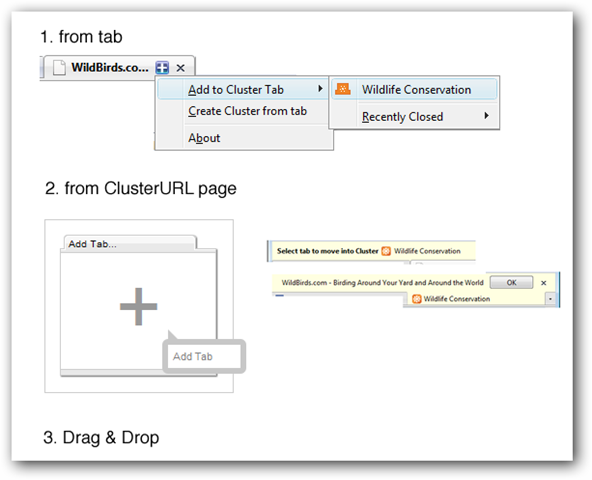
Cluster Tabs is a cool firefox addon which comes to rescue in such a type situations and it makes firefox more faster and fix the crashing issue due to large number of tabs – it allows you to cluster tab web addresses with others.

cluster-tabs


You just need to follow the procedure as described in the image above to add more than one web addresses to a single tab to create a cluster of websites under a single tab entry.

Every cluster tab you create or edit has a pubic & anonymous Cluster URL (clusterurl.com) automatically published on the web. You can anytime share these cluster tabs with your friends and others 
Some Other Key Features Of Cluster Tabs are
  1. Share your cluster tabs on web
  2. No registration required & public & anonymous so you just install it and you are ready to go.
  3. Your browsing history remains private.

Install Cluster Tabs
Copy from : http://www.technixupdate.com

Save Documents Online

Now you can open, edit and save documents to the Web from within Microsoft Office Word, Excel and PowerPoint.

The Office Live Add-in installs a new toolbar in Microsoft Office XP and Office 2003 and new menu options in the Microsoft Office 2007.


Use the toolbar and menu options to save your Office Word, Excel, and PowerPoint documents directly to Microsoft Office Live Workspace beta, a free Web-based service for storing and sharing documents online.

If you use the Firefox browser, the Office Live Workspace Plug-In for Firefox lets you open, edit, and save Microsoft Office documents in Office Live Workspace directly from the browser using Office Word, Excel, and PowerPoint.

You can download the add-in using following link:
Download Link
Get Free Office Live Workspace Account

Copy from : http://www.askvg.com

Windows 7 Pricing Announced

Microsoft Corporation today announced the pricing plans for its next operating system – Windows 7. The most popular version product, Windows Home Premium, receiving about a 10% price drop. Basically the customers will be paying less and getting more with Windows 7. This includes fun new features such as Home Group, Device Stage, Aero Shake, Snap, Peek, Jump Lists and completely redesigned Windows Taskbar. Windows 7 is already in great discussion for its features and overall package.

windows 7
Microsoft will offer people in select markets the opportunity to pre-order Windows 7 at a more than 50% discount. In the US, this will mean you can pre-order Windows 7 Home Premium for USD $49.99 or Windows 7 Professional for USD $99.99. You can take advantage of this special offer online via select retail partners such as Best Buy or Amazon, or the online Microsoft Store (in participating markets).

Pricing plans of Windows 7

  • Upgrades:
    • Home Premium $ 119.99 (Vista Launch price of $159.99)
    • Professional* $ 199.99 (Vista launch price of $199.99)
    • Ultimate $ 259.99 (Vista launch price of $259.99)

  • Pre-Order Upgrades:
    • Home Premium $49.99
    • Professional $99.99

  • Full Retail:
    • Home Premium $ 199.99 (Vista launch price $239.99)
    • Professional* $ 299.99 (Vista launch price $299.99)
    • Ultimate $ 319.99 (Vista launch price $399.99

On October 22nd, Windows 7 will be available in the following 14 languages: English, Spanish, Japanese, German, French, Italian, Dutch, Russian, Polish, Brazilian Portuguese, Korean, Simplified Chinese, Traditional Chinese and Chinese (Hong Kong).

Copy from : http://www.nirmaltv.com

Title Fix - Hide Title In Internet Explorer – Set Custom Title In Internet Explorer

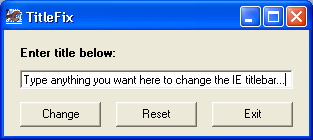
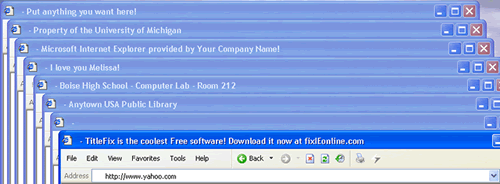
Title Fix is a free small piece of software which lets you change the text written in the title bar of any website opened in Internet Explorer. This means you can set any custom text on the title bar of internet explorer with this tiny application very quickly and easily.

titlefix


It lets you write whatever you want to in the title bar of the internet explorer, this utility is completely portable and does not require any installation.

custom-title-text-internet-explorer


Download Title Fix
Copy from : http://www.technixupdate.com

Hide Page Title Text In FireFox Of Any Webpage

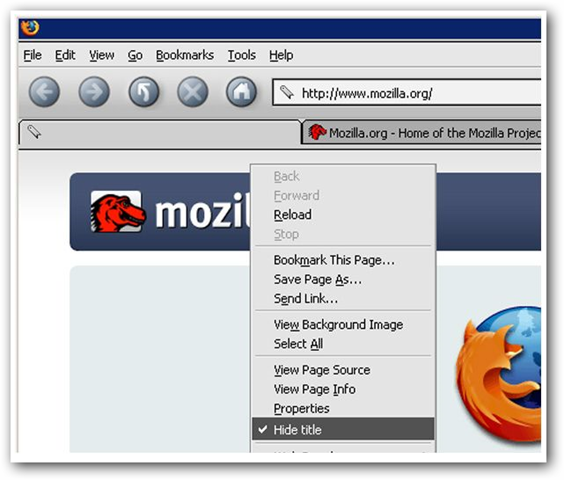
The Page Title Eraser (PTE) is a cool firefox addon which lets you hide title text of ay website you open in firefox and the favicon too of the selected tab. It provides more privacy at your workplace like office where you may want to hide the title text of the website you have opened on your office computer.

page-tile-text


As you can see in the image above the title of the page is hidden and you can also hide favicon of the website with this extension for firefox.

Related Tip: Check Out Some Other FireFox Tips and Tricks

This extension adds a context menu entry under File Menu >> Tools in firefox and supports the following languages

Translations included: Arabic, Arabic (Saudi Arabia), Catalan, Chinese (Simplified), Chinese (Traditional), Croatian, Deutsch, Dutch (NL), English, French, Italian, Japanese, Korean, Persian, Polish, Portuguese (Brazilian), Russian, Slovak, Spanish (Spain), Turkish.

See Also:  Hide Caption Title Bar FireFox Addon To Hide Title Bar Text

Note: This plugin works upto FireFox 1.5 – 3.0*

Install Page Title Eraser
Copy from : http://www.technixupdate.com

Recover Deleted Files On NTFS File System

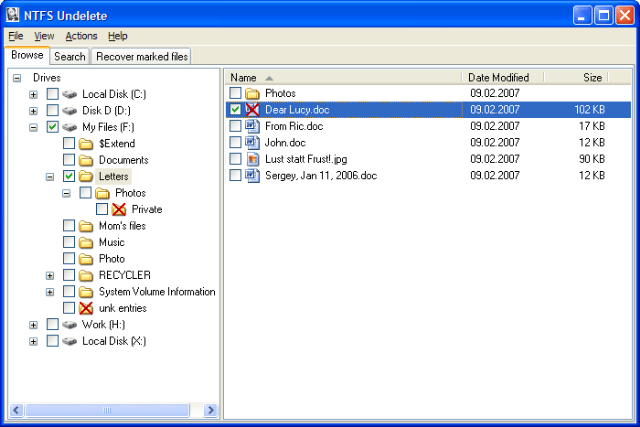
NTFS Undelete is a paid program which lets you recover any deleted file on your hard drive, it will recover irrespective of file has been emptied from recycle bin or you had press shift+delete to delete the file.

ntfs-undelete


It will not only recover the deleted and erased files from NTFS file system but also from other file system in windows including FAT and FAT32. But before you use this tool for recovery you should better know what happens when you delete a file on your computer.

When you delete a file, its content remains physically intact but the space occupied by the file is marked as free and can be allotted to any new file created. So the next file created/copied/saved to disk can overwrite the content of the deleted file and make it very difficult for you to recover that file.

Note: It is very important that no application writes on the hard disk partition from where the file has been deleted and small new file can create problems.

Follow the procedure below to recover the files that has been deleted
  1. Do not open or close files and applications on your computer as many applications create temporary files
  2. If the file has been deleted on the C drive you should not install NTFS Undelete on the C drive which is the default location for installation
  3. If you have only partition on your computer you should not install NTFS Undelete you can download the ISO image of NTFS Undelete program but remember to use another computer to burn the image to cd or dvd
  4. If the deleted files are not on the system drive on your computer, then you can download NTFS Undelete Windows Installer Program
  5. Using the program to recover your deleted files is quite simple when you follow all the steps given above very safely as they are described, Have a happy data recovery


Download NTFS Undelete
Copy from : http://www.technixupdate.com